I benchmarked 14 local OCR engines on a Mac
Most of what I give to LLMs and agents starts as a PDF, a scan or a photo of a page. Sending the image costs a lot of tokens, and a PDF’s text layer is often missing or scrambled. Markdown is the cheapest form an LLM can read: headings, lists and tables survive, and nothing else gets in the way. It works the other way too. I would rather have an LLM write Markdown and let pandoc turn it into a Word file or a slide deck than have it produce the document itself.
So I built LocalOCR, a small local app for my M3 Max. It does two things: Extract turns scans, PDFs and Office files into lean Markdown, and Publish turns Markdown into DOCX, PPTX, PDF, XLSX and more. Everything runs on the laptop; nothing is uploaded.
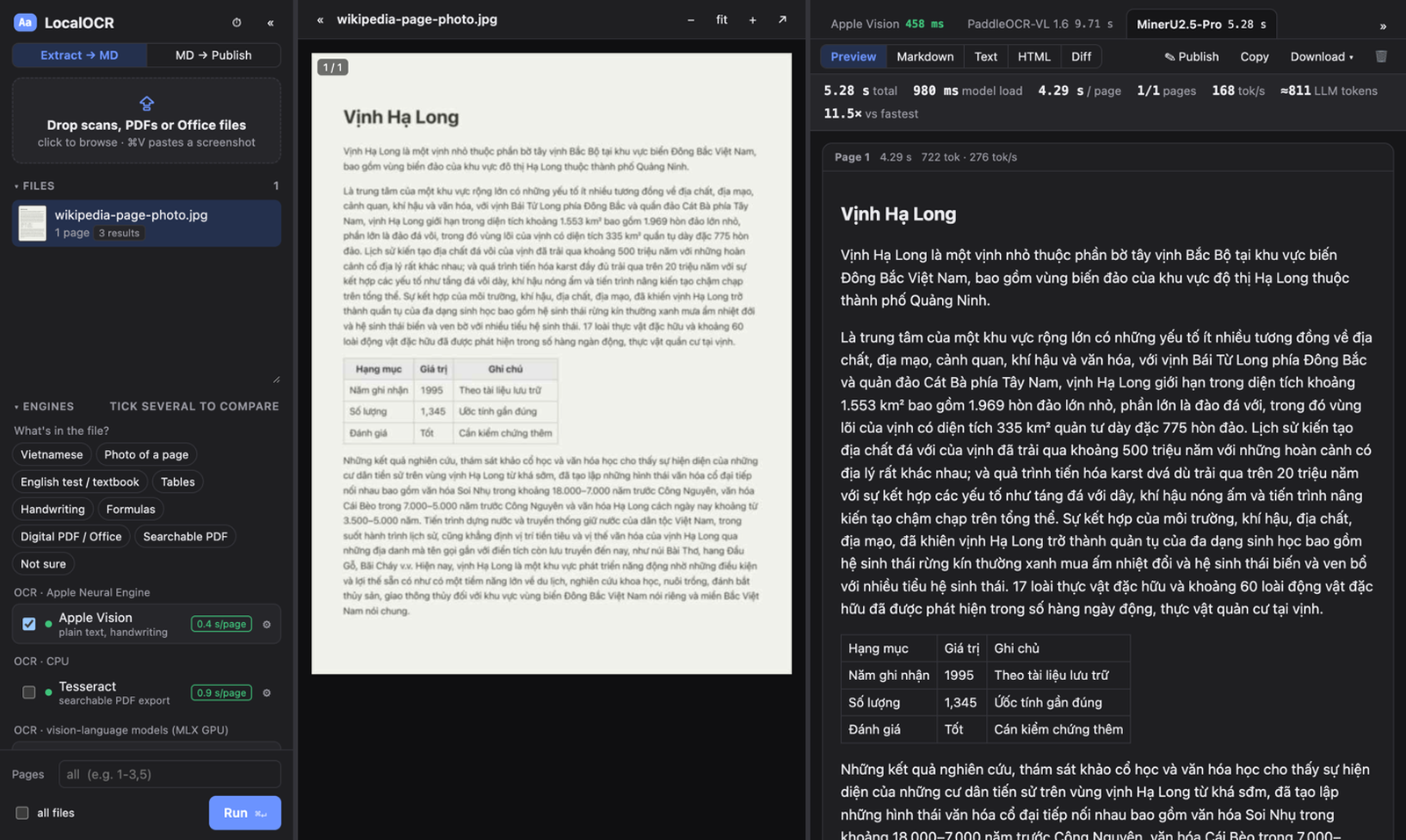
The hard part was choosing an OCR engine. New open OCR models appear every few weeks, and each one claims to top some leaderboard. Those leaderboards are mostly English and Chinese PDFs, though, and they rarely mention speed on a laptop. I care about three things: Vietnamese documents, photos of pages taken with a phone, and English tests and textbooks with tables. So I measured them myself.
What I measured
I collected 122 samples where the correct text is known:
- English pages from OmniDocBench: exam papers, textbooks, slides, multi-column articles, tables and formulas.
- The same pages, badly captured: scanned, warped, photographed off a screen, badly lit or skewed (from Real5-OmniDocBench), or shrunk to 40 %.
- Vietnamese: pages typeset from Vietnamese Wikipedia, both clean and degraded to look like phone photos, plus printed lines and handwriting.
- English handwriting from the IAM dataset.
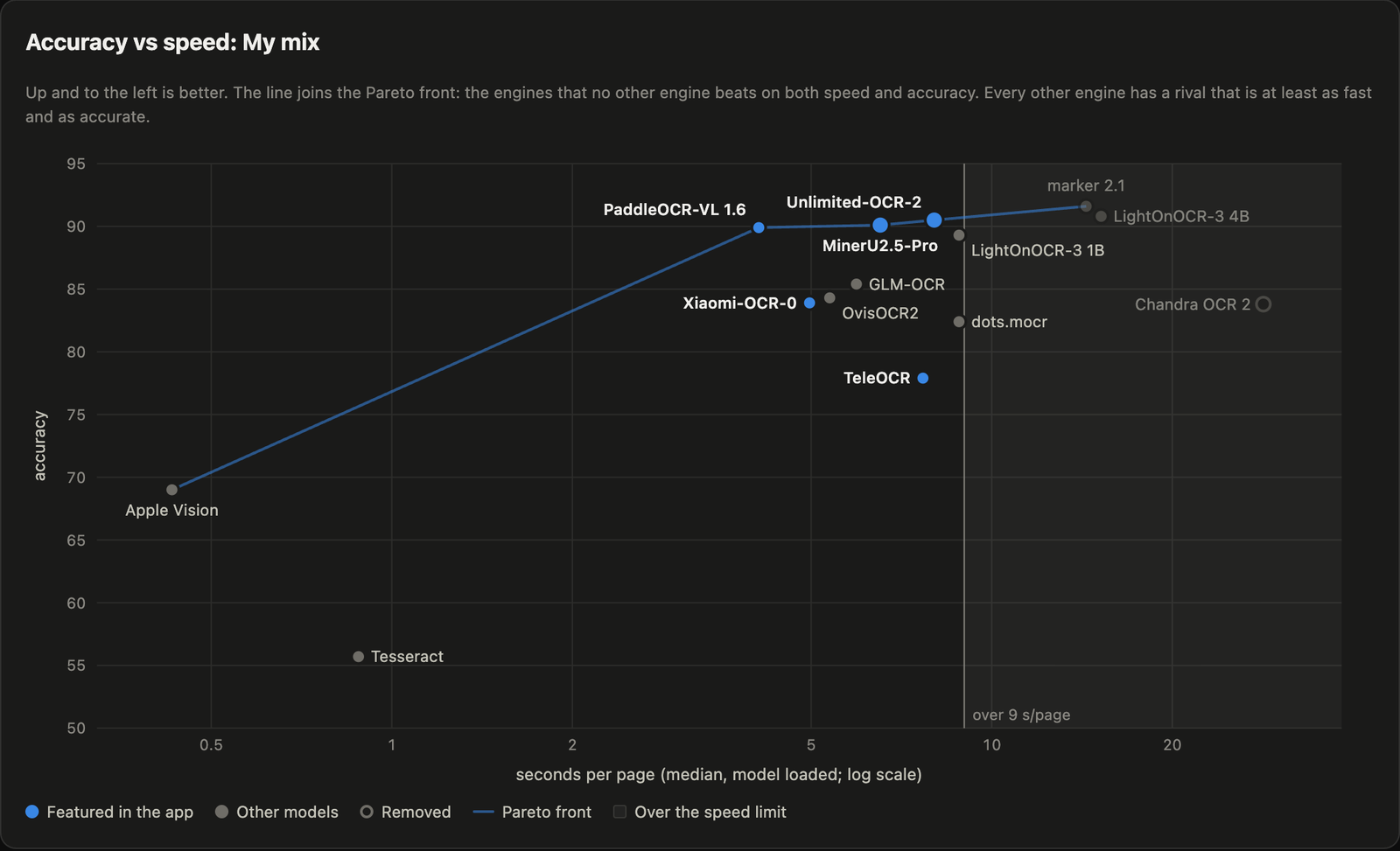
Text is scored by edit distance, tables by tree-edit distance (TEDS) and formulas by edit distance on the LaTeX, all on a 0–100 scale. Speed is the median time per page with the model already loaded. I grouped the categories into use cases, and My mix is the average of the three I care about.
The engines: Apple Vision (built into macOS), Tesseract, marker, and eleven vision-language models run on the GPU through MLX: PaddleOCR-VL 1.6, MinerU2.5-Pro, Unlimited-OCR-2, Xiaomi-OCR-0, TeleOCR, GLM-OCR, OvisOCR2, dots.mocr, LightOnOCR-3 (1B and 4B) and Chandra OCR 2.
The results
| Engine | My mix | Vietnamese | Photos of pages | English tests | s/page |
|---|---|---|---|---|---|
| marker | 91.6 | 95.5 | 93.2 | 86.1 | 14.4 |
| LightOnOCR-3 4B | 90.8 | 98.8 | 88.5 | 85.1 | 15.2 |
| Unlimited-OCR-2 | 90.5 | 93.3 | 88.7 | 89.4 | 8.0 |
| MinerU2.5-Pro | 90.1 | 94.8 | 87.4 | 88.1 | 6.5 |
| PaddleOCR-VL 1.6 | 89.9 | 91.0 | 89.3 | 89.4 | 4.1 |
| Xiaomi-OCR-0 | 83.9 | 79.7 | 81.7 | 90.4 | 5.0 |
| TeleOCR | 77.9 | 61.5 | 79.8 | 92.3 | 7.7 |
| Apple Vision | 69.0 | 91.6 | 53.1 | 62.4 | 0.43 |
| Tesseract | 55.7 | 71.3 | 41.3 | 54.4 | 0.88 |
The full table, with every category and a short card for each engine, is in the interactive report.
The top is a tie. Under 9 seconds a page, Unlimited-OCR-2, MinerU2.5-Pro and PaddleOCR-VL score 90.5, 90.1 and 89.9. A bootstrap confidence interval puts the uncertainty at about ±3.5 points, so with this many samples they cannot be told apart. PaddleOCR-VL is the fastest of the three, so it became the default.
Specialists win their own column. TeleOCR is the most accurate on English tests (92.3) but drops to 61.5 on Vietnamese: it was trained on Chinese and English and loses the diacritics. Xiaomi-OCR-0 has the same problem. For Vietnamese, MinerU2.5-Pro and LightOnOCR-3 are the safe choices.
The built-in engine is surprisingly good. Apple Vision reads a page in under half a second with no GPU, scores 91.6 on Vietnamese and handles handwriting well. It falls apart on photos, tables and multi-column pages, but it sits on the Pareto front: no other engine is both faster and more accurate.
Formulas are still hard. Every model scored between 56 and 69 on them, so I check formula output by eye.
The surprise: read the page block by block
Several of these models (PaddleOCR-VL, GLM-OCR, MinerU and TeleOCR) were trained to read one block of a page at a time: a paragraph, a table or a formula. Their own pipelines first run a layout model to find the blocks, then ask the VLM to read each crop with a task-specific prompt. Given a whole page instead, as most simple wrappers do, they still produce fluent text, so the failure is easy to miss.
The numbers were dramatic. Reading whole pages, PaddleOCR-VL scored 0.0 on tables and 7.6 on formulas. With a layout step in front (PP-DocLayoutV3, also on MLX), the same model scored 91.6 on tables and 65.8 on formulas. GLM-OCR’s tables went from 32.5 to 87.7. Block mode isn’t free: it costs a little on clean Vietnamese pages, where whole-page reading was already near perfect. But on anything with structure, it is the difference between usable and useless.
The lesson I took away: before trusting a leaderboard number, check how the model was meant to be called.
A few practical notes
- Image size is the biggest speed lever. For a VLM on a Mac, most of the time goes into processing the image, not into writing the text. Capping the longer side at 1280 px made one model three times faster on a full page.
- Not everything needs OCR. For digital PDFs, the text layer is instant. For Word, PowerPoint and Excel files, Microsoft’s MarkItDown gives the leanest Markdown, and pandoc the most faithful.
- There is a command line for agents.
localocr extract scan.jpgprints Markdown to standard output, so an agent can call it like any other tool.
Caveats
This is a personal benchmark, not a leaderboard. Some categories have only two samples, the use-case weights reflect my own work, and everything ran on a single M3 Max. The Vietnamese pages are typeset rather than real scans. If your documents look different, the benchmark scripts are in the repository: point them at your own samples and let it run overnight.
LocalOCR is on GitHub under the MIT licence: github.com/DungMinhDao/LocalOCR. It needs a Mac with Apple Silicon. Feedback is welcome, especially from anyone doing OCR in languages other than English.