<?xml version="1.0" encoding="utf-8"?><feed xmlns="http://www.w3.org/2005/Atom" xml:lang="en"><generator uri="https://jekyllrb.com/" version="3.10.0">Jekyll</generator><link href="https://dungminhdao.github.io/blog/feed.xml" rel="self" type="application/atom+xml" /><link href="https://dungminhdao.github.io/" rel="alternate" type="text/html" hreflang="en" /><updated>2026-11-06T20:22:45+00:00</updated><id>https://dungminhdao.github.io/blog/feed.xml</id><title type="html">Minh-Dung Dao</title><subtitle>Minh-Dung Dao is a PhD researcher at University College Cork building reliable, multimodal AI for clinical training, and working on LLM agents.</subtitle><author><name>Minh-Dung Dao</name></author><entry xml:lang="en"><title type="html">I benchmarked 14 local OCR engines on a Mac</title><link href="https://dungminhdao.github.io/blog/2026/local-ocr-benchmark/" rel="alternate" type="text/html" title="I benchmarked 14 local OCR engines on a Mac" /><published>2026-11-06T00:00:00+00:00</published><updated>2026-11-06T00:00:00+00:00</updated><id>https://dungminhdao.github.io/blog/2026/local-ocr-benchmark</id><content type="html" xml:base="https://dungminhdao.github.io/blog/2026/local-ocr-benchmark/"><![CDATA[<p>Most of what I give to LLMs and agents starts as a PDF, a scan or a photo of a page. Sending the image costs a lot of tokens, and a PDF’s text layer is often missing or scrambled. Markdown is the cheapest form an LLM can read: headings, lists and tables survive, and nothing else gets in the way. It works the other way too. I would rather have an LLM write Markdown and let <a href="https://pandoc.org">pandoc</a> turn it into a Word file or a slide deck than have it produce the document itself.</p>

<p>So I built <a href="https://github.com/DungMinhDao/LocalOCR">LocalOCR</a>, a small local app for my M3 Max. It does two things: <strong>Extract</strong> turns scans, PDFs and Office files into lean Markdown, and <strong>Publish</strong> turns Markdown into DOCX, PPTX, PDF, XLSX and more. Everything runs on the laptop; nothing is uploaded.</p>

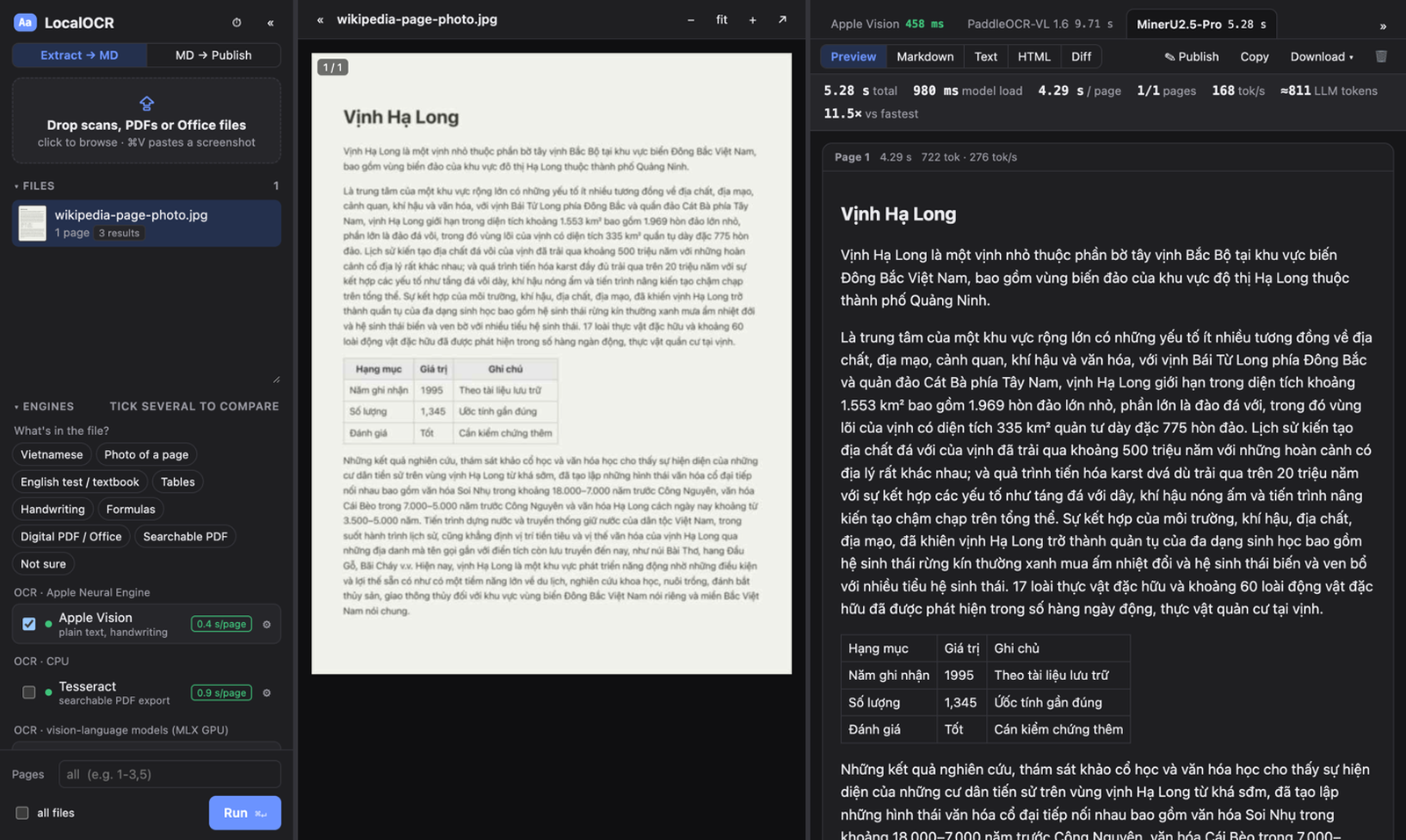
<p><img src="/assets/posts/local-ocr-benchmark/extract.png" alt="LocalOCR's Extract mode: a photographed page on the left and the Markdown from three OCR engines on the right" /></p>

<p>The hard part was choosing an OCR engine. New open OCR models appear every few weeks, and each one claims to top some leaderboard. Those leaderboards are mostly English and Chinese PDFs, though, and they rarely mention speed on a laptop. I care about three things: Vietnamese documents, photos of pages taken with a phone, and English tests and textbooks with tables. So I measured them myself.</p>

<h2 id="what-i-measured">What I measured</h2>

<p>I collected 122 samples where the correct text is known:</p>

<ul>
  <li><strong>English pages</strong> from <a href="https://github.com/opendatalab/OmniDocBench">OmniDocBench</a>: exam papers, textbooks, slides, multi-column articles, tables and formulas.</li>
  <li><strong>The same pages, badly captured</strong>: scanned, warped, photographed off a screen, badly lit or skewed (from Real5-OmniDocBench), or shrunk to 40 %.</li>
  <li><strong>Vietnamese</strong>: pages typeset from Vietnamese Wikipedia, both clean and degraded to look like phone photos, plus printed lines and handwriting.</li>
  <li><strong>English handwriting</strong> from the IAM dataset.</li>
</ul>

<p>Text is scored by edit distance, tables by tree-edit distance (TEDS) and formulas by edit distance on the LaTeX, all on a 0–100 scale. Speed is the median time per page with the model already loaded. I grouped the categories into use cases, and <em>My mix</em> is the average of the three I care about.</p>

<p>The engines: Apple Vision (built into macOS), Tesseract, marker, and eleven vision-language models run on the GPU through <a href="https://github.com/ml-explore/mlx">MLX</a>: PaddleOCR-VL 1.6, MinerU2.5-Pro, Unlimited-OCR-2, Xiaomi-OCR-0, TeleOCR, GLM-OCR, OvisOCR2, dots.mocr, LightOnOCR-3 (1B and 4B) and Chandra OCR 2.</p>

<h2 id="the-results">The results</h2>

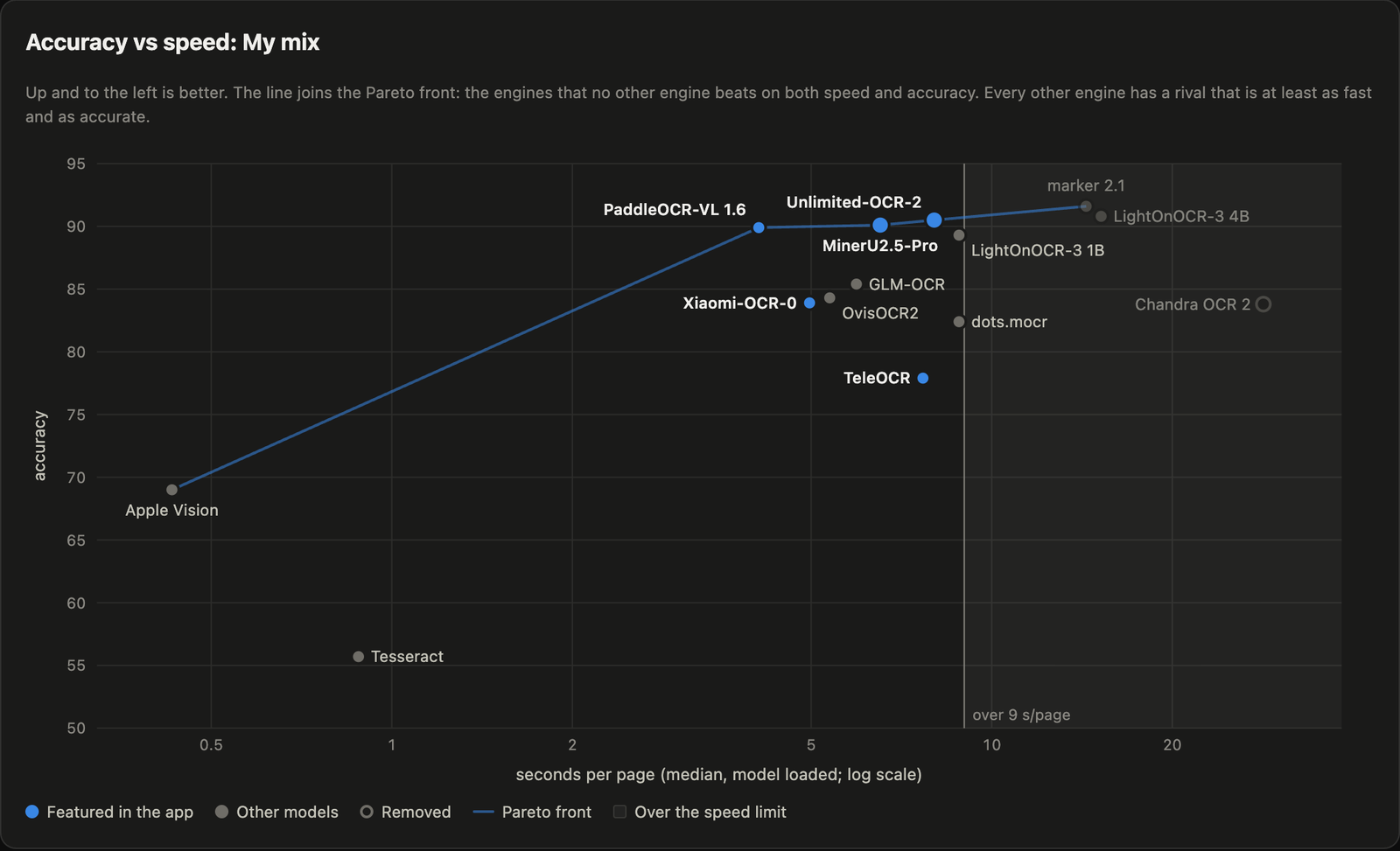
<p><img src="/assets/posts/local-ocr-benchmark/accuracy-vs-speed.png" alt="Accuracy against seconds per page for each engine on my mix of use cases. PaddleOCR-VL, MinerU2.5-Pro and Unlimited-OCR-2 cluster around 90 at 4 to 8 seconds per page; Apple Vision is at 69 in under half a second" /></p>

<table>
  <thead>
    <tr>
      <th>Engine</th>
      <th>My mix</th>
      <th>Vietnamese</th>
      <th>Photos of pages</th>
      <th>English tests</th>
      <th>s/page</th>
    </tr>
  </thead>
  <tbody>
    <tr>
      <td>marker</td>
      <td><strong>91.6</strong></td>
      <td>95.5</td>
      <td><strong>93.2</strong></td>
      <td>86.1</td>
      <td>14.4</td>
    </tr>
    <tr>
      <td>LightOnOCR-3 4B</td>
      <td>90.8</td>
      <td><strong>98.8</strong></td>
      <td>88.5</td>
      <td>85.1</td>
      <td>15.2</td>
    </tr>
    <tr>
      <td>Unlimited-OCR-2</td>
      <td>90.5</td>
      <td>93.3</td>
      <td>88.7</td>
      <td>89.4</td>
      <td>8.0</td>
    </tr>
    <tr>
      <td>MinerU2.5-Pro</td>
      <td>90.1</td>
      <td>94.8</td>
      <td>87.4</td>
      <td>88.1</td>
      <td>6.5</td>
    </tr>
    <tr>
      <td>PaddleOCR-VL 1.6</td>
      <td>89.9</td>
      <td>91.0</td>
      <td>89.3</td>
      <td>89.4</td>
      <td>4.1</td>
    </tr>
    <tr>
      <td>Xiaomi-OCR-0</td>
      <td>83.9</td>
      <td>79.7</td>
      <td>81.7</td>
      <td>90.4</td>
      <td>5.0</td>
    </tr>
    <tr>
      <td>TeleOCR</td>
      <td>77.9</td>
      <td>61.5</td>
      <td>79.8</td>
      <td><strong>92.3</strong></td>
      <td>7.7</td>
    </tr>
    <tr>
      <td>Apple Vision</td>
      <td>69.0</td>
      <td>91.6</td>
      <td>53.1</td>
      <td>62.4</td>
      <td><strong>0.43</strong></td>
    </tr>
    <tr>
      <td>Tesseract</td>
      <td>55.7</td>
      <td>71.3</td>
      <td>41.3</td>
      <td>54.4</td>
      <td>0.88</td>
    </tr>
  </tbody>
</table>

<p>The full table, with every category and a short card for each engine, is in the <a href="https://dungminhdao.github.io/LocalOCR/bench/report.html">interactive report</a>.</p>

<p><strong>The top is a tie.</strong> Under 9 seconds a page, Unlimited-OCR-2, MinerU2.5-Pro and PaddleOCR-VL score 90.5, 90.1 and 89.9. A bootstrap confidence interval puts the uncertainty at about ±3.5 points, so with this many samples they cannot be told apart. PaddleOCR-VL is the fastest of the three, so it became the default.</p>

<p><strong>Specialists win their own column.</strong> TeleOCR is the most accurate on English tests (92.3) but drops to 61.5 on Vietnamese: it was trained on Chinese and English and loses the diacritics. Xiaomi-OCR-0 has the same problem. For Vietnamese, MinerU2.5-Pro and LightOnOCR-3 are the safe choices.</p>

<p><strong>The built-in engine is surprisingly good.</strong> Apple Vision reads a page in under half a second with no GPU, scores 91.6 on Vietnamese and handles handwriting well. It falls apart on photos, tables and multi-column pages, but it sits on the Pareto front: no other engine is both faster and more accurate.</p>

<p><strong>Formulas are still hard.</strong> Every model scored between 56 and 69 on them, so I check formula output by eye.</p>

<h2 id="the-surprise-read-the-page-block-by-block">The surprise: read the page block by block</h2>

<p>Several of these models (PaddleOCR-VL, GLM-OCR, MinerU and TeleOCR) were trained to read one block of a page at a time: a paragraph, a table or a formula. Their own pipelines first run a layout model to find the blocks, then ask the VLM to read each crop with a task-specific prompt. Given a whole page instead, as most simple wrappers do, they still produce fluent text, so the failure is easy to miss.</p>

<p>The numbers were dramatic. Reading whole pages, PaddleOCR-VL scored <strong>0.0 on tables</strong> and 7.6 on formulas. With a layout step in front (<a href="https://huggingface.co/HashNuke/pp-doclayout-v3-mlx">PP-DocLayoutV3</a>, also on MLX), the same model scored <strong>91.6 on tables</strong> and 65.8 on formulas. GLM-OCR’s tables went from 32.5 to 87.7. Block mode isn’t free: it costs a little on clean Vietnamese pages, where whole-page reading was already near perfect. But on anything with structure, it is the difference between usable and useless.</p>

<p>The lesson I took away: before trusting a leaderboard number, check how the model was meant to be called.</p>

<h2 id="a-few-practical-notes">A few practical notes</h2>

<ul>
  <li><strong>Image size is the biggest speed lever.</strong> For a VLM on a Mac, most of the time goes into processing the image, not into writing the text. Capping the longer side at 1280 px made one model three times faster on a full page.</li>
  <li><strong>Not everything needs OCR.</strong> For digital PDFs, the text layer is instant. For Word, PowerPoint and Excel files, Microsoft’s <a href="https://github.com/microsoft/markitdown">MarkItDown</a> gives the leanest Markdown, and pandoc the most faithful.</li>
  <li><strong>There is a command line for agents.</strong> <code class="language-plaintext highlighter-rouge">localocr extract scan.jpg</code> prints Markdown to standard output, so an agent can call it like any other tool.</li>
</ul>

<h2 id="caveats">Caveats</h2>

<p>This is a personal benchmark, not a leaderboard. Some categories have only two samples, the use-case weights reflect my own work, and everything ran on a single M3 Max. The Vietnamese pages are typeset rather than real scans. If your documents look different, the benchmark scripts are in the repository: point them at your own samples and let it run overnight.</p>

<p>LocalOCR is on GitHub under the MIT licence: <a href="https://github.com/DungMinhDao/LocalOCR">github.com/DungMinhDao/LocalOCR</a>. It needs a Mac with Apple Silicon. Feedback is welcome, especially from anyone doing OCR in languages other than English.</p>]]></content><author><name>Minh-Dung Dao</name></author><summary type="html"><![CDATA[Which OCR model to use for scans, photos, Vietnamese and English tests on Apple Silicon, measured on 122 pages, and why the best ones read a page block by block.]]></summary></entry><entry xml:lang="en"><title type="html">Quick note on the definition of AI</title><link href="https://dungminhdao.github.io/blog/2022/definition-of-ai/" rel="alternate" type="text/html" title="Quick note on the definition of AI" /><published>2022-05-25T00:00:00+01:00</published><updated>2022-05-25T00:00:00+01:00</updated><id>https://dungminhdao.github.io/blog/2022/definition-of-ai</id><content type="html" xml:base="https://dungminhdao.github.io/blog/2022/definition-of-ai/"><![CDATA[<p><em>First published on my old blog in May 2022.</em></p>

<p>As a final-year student with some experience in artificial intelligence (AI) and machine learning (ML), I was glad to have a chance to revisit the definition of AI through Stanford University’s introductory AI course, CS221, whose content is available online. It was also a chance to look back at the Introduction to AI course I took in my second year at Hanoi University of Science and Technology (HUST).</p>

<h2 id="what-ai-and-ml-meant-to-me-before-this-course">What AI and ML meant to me before this course</h2>

<p>After many days of reading about the definition of AI in my early years at university, I finally settled on a definition that seemed general enough. In my own words: <strong>“Artificial intelligence is any kind of simulation that exhibits a feature of intelligence.”</strong> This definition works for me for a few reasons:</p>

<ul>
  <li>Some definitions equate intelligence with human intelligence, which I think limits them. Animals show some kinds of intelligence, and there may be kinds of intelligence that humans don’t have.</li>
  <li>Simulations are generally created by humans, but “simulation” here simply means “artificial”: not occurring in nature.</li>
  <li>There are many types of intelligence and abilities associated with it (Wikipedia lists abstraction, logic, understanding, learning, emotional knowledge and more), and there is no single definition of intelligence. So exhibiting one of those traits is enough.</li>
</ul>

<p>Tom M. Mitchell’s definition of machine learning, from his book <em>Machine Learning</em>, is widely accepted:</p>

<blockquote>
  <p>“A computer program is said to learn from experience E with respect to some class of tasks T and performance measure P if its performance at tasks in T, as measured by P, improves with experience E.”</p>
</blockquote>

<p>ML is often regarded as a subset of AI. The difference is that ML has an element called <strong>learning</strong>: performance improves with more data or experience.</p>

<h2 id="my-unanswered-question">My unanswered question</h2>

<p>So what was the problem? I already had a definition I was happy with. What interested me next was this: <strong>how can we categorise AI and ML in a way that aligns with aspects of natural intelligence?</strong> There are already some common ways of categorising them:</p>

<ul>
  <li>By learning method: supervised, unsupervised and reinforcement learning, and so on</li>
  <li>By type of task: computer vision, natural language processing, speech processing, and so on</li>
</ul>

<p>These groupings are useful, but I wasn’t satisfied, because they feel unnatural:</p>

<ul>
  <li>They split AI and ML problems according to human-defined concepts (supervised learning, for example) or human functions (seeing becomes computer vision, speaking becomes speech processing). This <strong>ignores general aspects of intelligence</strong>, such as logic and abstraction.</li>
  <li>There is little to compare between the groups. <strong>There doesn’t seem to be a scale from “low” to “high”</strong> on which to measure the categories against each other.</li>
</ul>

<h2 id="the-introduction-to-ai-course-at-my-university-and-my-doubt">The Introduction to AI course at my university, and my doubt</h2>

<p>These were the topics in my AI class:</p>

<ul>
  <li>Search problems: tree search (BFS, DFS), heuristic methods, constraint satisfaction problems (CSPs)</li>
  <li>Logic: propositional logic, first-order logic</li>
  <li>Machine learning: some common methods (kNN, naive Bayes, decision trees, neural networks)</li>
</ul>

<p>Studying the course made me feel there was some kind of ordered categorisation here. Maybe the difficulty of the problems was the scale I was looking for? Or was the scale based on how abstract the problems are?</p>

<p>At the beginning of the course there was an overview of the history of AI. However, we students were never told why the course was structured that way; we only knew the topics.</p>

<h2 id="what-i-learned-and-deduced-from-stanfords-ai-course">What I learned and deduced from Stanford’s AI course</h2>

<p>First, from the lecturer’s point of view, AI rests on three pillars: <strong>modelling</strong> (creating a mathematical or logical representation of the real world), <strong>inference</strong> (answering questions about models, such as finding a shortest path or a winning strategy) and <strong>learning</strong> (turning an abstract model into a concrete one with the help of additional data).</p>

<p>The course groups AI models into four types, sorted from “low” to “high” levels of intelligence:</p>

<ul>
  <li>A <strong>reflex-based model</strong> is a <em>fixed sequence of computations</em> that produces the output. This corresponds to everyday reflexive tasks we do very quickly, such as recognising an object in the house.</li>
  <li>A <strong>state-based model</strong> considers the available <em>states</em> and the <em>actions</em> possible in each state, and plans the step-by-step actions to follow. Some of our favourite games, such as chess and Go, fit this model, as do puzzles like the classic river crossing with a farmer, a wolf, a goat and a cabbage.</li>
  <li>A <strong>variable-based model</strong> assigns values to <em>variables</em> subject to some <em>factors or constraints</em>, regardless of order. Sudoku can be modelled well in this category.</li>
  <li>A <strong>logic-based model</strong> can digest heterogeneous information into <em>syntactic</em> and <em>semantic</em> representations and reason deeply using <em>inference rules</em>. Much of the everyday logical reasoning we do can be represented with this type of model.</li>
</ul>

<p><strong>So there is an ordered categorisation here!</strong> Great news for me. To make the ordering clearer, I went through the course and tried to <strong>build scales that organise the problems and models along the three pillars</strong>. Here is my own summary, based on what I learned from the course:</p>

<table>
  <thead>
    <tr>
      <th>Model type</th>
      <th>Modelling</th>
      <th>Inference</th>
      <th>Learning</th>
    </tr>
  </thead>
  <tbody>
    <tr>
      <td><strong>Reflex</strong></td>
      <td>Abstract model, a “massive lookup table of best actions”</td>
      <td>Follow a fixed sequence of steps to get the output</td>
      <td>Has to learn from (lots of) data</td>
    </tr>
    <tr>
      <td><strong>States</strong></td>
      <td>Local interactions between states (like in a graph)</td>
      <td>Combine local interactions to find optimal solutions</td>
      <td>Gets data through exploration</td>
    </tr>
    <tr>
      <td><strong>Variables</strong></td>
      <td>Solutions are assigned to variables (lots of possibilities)</td>
      <td>Find assignments to variables, or do probabilistic inference</td>
      <td>Needs little data; incorporates prior domain knowledge</td>
    </tr>
    <tr>
      <td><strong>Logic</strong></td>
      <td>Syntax and semantics, highly expressive</td>
      <td>Draw (deep) logical conclusions from knowledge, but rules can be deterministic</td>
      <td>Rule-based; doesn’t allow fine-tuning with data</td>
    </tr>
    <tr>
      <td><strong>Trend, from reflex to logic</strong></td>
      <td>Models get <strong>simpler</strong> and <strong>more expressive</strong>, moving from abstract to concrete (less learning)</td>
      <td>Inference gets <strong>more complex</strong> and <strong>handles less uncertainty</strong></td>
      <td>Learning gets <strong>easier</strong>, but there is <strong>less ability to fine-tune</strong> with additional data</td>
    </tr>
  </tbody>
</table>

<h2 id="conclusion">Conclusion</h2>

<p>In the end, I found what I was looking for: an ordered grouping that aligns with aspects of natural intelligence. This categorisation also filled the gap in my understanding of how my university’s Introduction to AI course was structured.</p>

<p>There are many more topics in CS221. I think it’s a very good course for anyone who wants an overview of what AI is, and a starting point for exploring specific areas of AI and ML.</p>

<h2 id="references">References</h2>

<ul>
  <li><a href="https://stanford-cs221.github.io/spring2022/modules/">CS221, Spring 2022: lecture modules</a></li>
  <li><a href="https://en.wikipedia.org/wiki/Intelligence">Intelligence, Wikipedia</a></li>
  <li>Tom M. Mitchell, <em>Machine Learning</em>, McGraw-Hill, 1997</li>
</ul>]]></content><author><name>Minh-Dung Dao</name></author><summary type="html"><![CDATA[A perspective from Stanford’s AI course, CS221: ordering AI problems from reflexes to logic.]]></summary></entry></feed>